
iOS 为多语系字串买份保险吧!
使用 SwifGen & UnitTest 确保多语系操作的安全

Photo by Mick Haupt
问题
纯文字档案
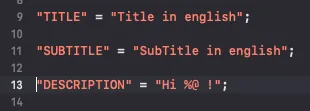
iOS 的多语系处理方式是 Localizable.strings 纯文字档案,不像 Android 是透过 XML 格式来管理;所以在日常开发上就会有不小心把语系档改坏或是漏加的风险再加上多语系不会在 Build Time 检查出错误,往往都是上线后,某个地区的使用者回报才发现问题,会大大降低使用者信心程度。
之前血淋淋的案例,大家 Swift 写的太习惯忘记 Localizable.strings 要加 ; ,导致某个语系上线后从漏掉 ; 的语句往后全坏掉;最后紧急 Hotfix 才化险为夷。
多语系有问题就会直接把 Key 显示给使用者
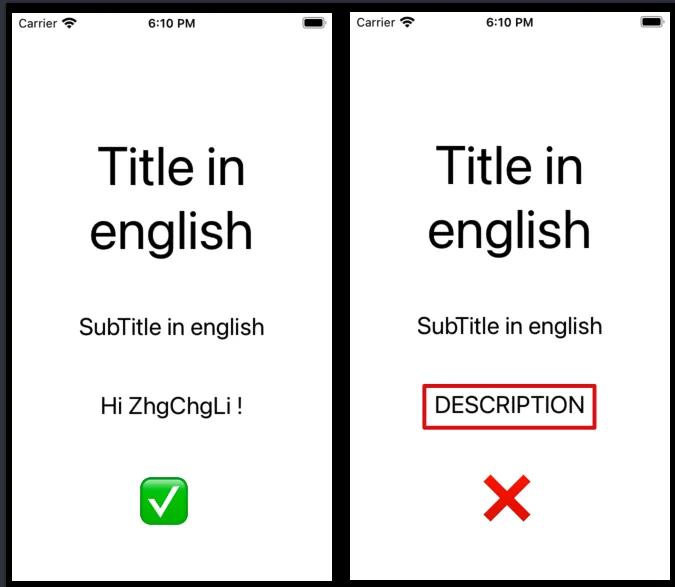
如上图所示,假设 DESCRIPTION Key 漏加, App就会直接显示 DESCRIPTION 给使用者。
检查需求
-
Localizable.strings 格式正确检查 (换行结尾需加上
;、合法 Key Value 对应) -
程式码中有取用的多语系 Key 要在 Localizable.strings 档有对应定义
-
Localizable.strings 档各个语系都要有相应的 Key Value 纪录
-
Localizable.strings 档不能有重复的 Key (否则 Value 会被意外覆盖)
解决方案
使用 Swift 撰写完整检查工具
之前的做法是「 Xcode 直接使用 Swift 撰写 Shell Script! 」参考 Localize 🏁 工具使用 Swift 开发 Command Line Tool 从外部做多语系档案检查,再把脚本放到 Build Phases Run Script 中,在 Build Time 执行检查。
优点: 检查程式是由外部注入,不依赖在专案上,可以不透过 XCode、不需 Build 专案也能执行检查、检查功能能精确到哪个档案的第几行;另外还能做 Format 功能 (排序多语系 Key A->Z)。
缺点: 增加 Build Time ( + ~= 3 mins)、流程发散,脚本有问题或需因应专案架构调整时难以交接维护,因这块不在专案内,除了加入这段检查进来的人知道整个逻辑,其他协作者很难碰触到这块。
有兴趣的朋友可以参考之前的那篇文章,本篇主要介绍的方式是透过 XCode 13+SwiftGen+UnitTest 来达成检查 Localizable.strings 的所有功能。
XCode 13 内建 Build Time 检查 Localizable.strings 档案格式正确性
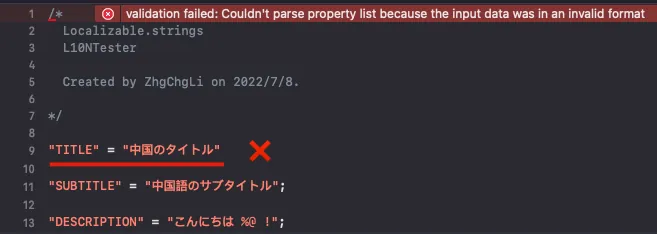
升级 XCode 13 之后就内建了 Build Time 检查 Localizable.strings 档案格式的功能,经测试检查的规格相当完整,除了漏掉 ; 外如有多余无意义的字串也会被挡下来。
使用 SwiftGen 取代原始 NSLocalizedString String Base 存取方式
SwiftGen 能帮助我们将原本的 NSLocalizedString String 存取方式改成 Object 存取,防止不小心打错字、忘记在 Key 宣告的情况出现。
SwiftGen 核心也是 Command Line Tool;但是这工具在业界蛮流行的而且有完整的文件及社群资源在维护,不必害怕导入这个工具后续难维护的问题。
可依照您的环境或 CI/CD 服务设定去选择安装方式,这边 Demo 直接用最直接的 CocoaPods 进行安装。
请注意 SwiftGen 并不是真的 CocoaPods,他不会跟专案中的程式码有任何依赖;使用 CocoaPods 安装 SwiftGen 单纯只是透过它下载这个 Command Line Tool 执行档回来。
在 podfile 中加入 swiftgen pod:
pod 'SwiftGen', '~> 6.0'
Init
pod install 之后打开 Terminal cd 到专案下
/L10NTests/Pods/SwiftGen/bin/swiftGen config init
init swiftgen.yml 设定档,并打开它
strings:
  - inputs:
      - "L10NTests/Supporting Files/zh-Hant.lproj/Localizable.strings"
    outputs:
      templateName: structured-swift5
      output: "L10NTests/Supporting Files/SwiftGen-L10n.swift"
      params:
        enumName: "L10n"
贴上并修改成符合您专案的格式:
inputs: 专案语系档案位置 (建议指定 DevelopmentLocalization 语系的语系档)
outputs: output: 转换结果的 swift 档案位置 params: enumName: 物件名称 templateName: 转换模板
可以下 swiftGen template list 取得内建的模板列表
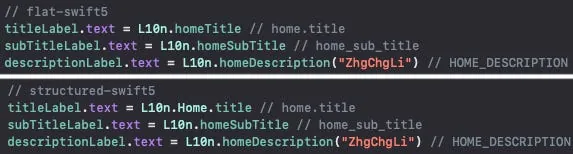
flat v.s. structured
差别在如果 Key 风格是 XXX.YYY.ZZZ flat 模板会转换成小驼峰;structured 模板会照原始风格转换成 XXX.YYY.ZZZ 物件。
纯 Swift 专案可直接使用内建模板,但若是 Swift 混 OC 的专案就需要自行客制化模板:
flat-swift5-objc.stencil :
// swiftlint:disable all
// Generated using SwiftGen — https://github.com/SwiftGen/SwiftGen

{% if tables.count > 0 %}
{% set accessModifier %}{% if param.publicAccess %}public{% else %}internal{% endif %}{% endset %}
import Foundation

// swiftlint:disable superfluous_disable_command file_length implicit_return

// MARK: - Strings

{% macro parametersBlock types %}{% filter removeNewlines:"leading" %}
  {% for type in types %}
    {% if type == "String" %}
    _ p{{forloop.counter}}: Any
    {% else %}
    _ p{{forloop.counter}}: {{type}}
    {% endif %}
    {{ ", " if not forloop.last }}
  {% endfor %}
{% endfilter %}{% endmacro %}
{% macro argumentsBlock types %}{% filter removeNewlines:"leading" %}
  {% for type in types %}
    {% if type == "String" %}
    String(describing: p{{forloop.counter}})
    {% elif type == "UnsafeRawPointer" %}
    Int(bitPattern: p{{forloop.counter}})
    {% else %}
    p{{forloop.counter}}
    {% endif %}
    {{ ", " if not forloop.last }}
  {% endfor %}
{% endfilter %}{% endmacro %}
{% macro recursiveBlock table item %}
  {% for string in item.strings %}
  {% if not param.noComments %}
  {% for line in string.translation\\|split:"\n" %}
  /// {{line}}
  {% endfor %}
  {% endif %}
  {% if string.types %}
  {{accessModifier}} static func {{string.key\\|swiftIdentifier:"pretty"\\|lowerFirstWord\\|escapeReservedKeywords}}({% call parametersBlock string.types %}) -> String {
    return {{enumName}}.tr("{{table}}", "{{string.key}}", {% call argumentsBlock string.types %})
  }
  {% elif param.lookupFunction %}
  {# custom localization function is mostly used for in-app lang selection, so we want the loc to be recomputed at each call for those (hence the computed var) #}
  {{accessModifier}} static var {{string.key\\|swiftIdentifier:"pretty"\\|lowerFirstWord\\|escapeReservedKeywords}}: String { return {{enumName}}.tr("{{table}}", "{{string.key}}") }
  {% else %}
  {{accessModifier}} static let {{string.key\\|swiftIdentifier:"pretty"\\|lowerFirstWord\\|escapeReservedKeywords}} = {{enumName}}.tr("{{table}}", "{{string.key}}")
  {% endif %}
  {% endfor %}
  {% for child in item.children %}
  {% call recursiveBlock table child %}
  {% endfor %}
{% endmacro %}
// swiftlint:disable function_parameter_count identifier_name line_length type_body_length
{% set enumName %}{{param.enumName\\|default:"L10n"}}{% endset %}
@objcMembers {{accessModifier}} class {{enumName}}: NSObject {
  {% if tables.count > 1 or param.forceFileNameEnum %}
  {% for table in tables %}
  {{accessModifier}} enum {{table.name\\|swiftIdentifier:"pretty"\\|escapeReservedKeywords}} {
    {% filter indent:2 %}{% call recursiveBlock table.name table.levels %}{% endfilter %}
  }
  {% endfor %}
  {% else %}
  {% call recursiveBlock tables.first.name tables.first.levels %}
  {% endif %}
}
// swiftlint:enable function_parameter_count identifier_name line_length type_body_length

// MARK: - Implementation Details

extension {{enumName}} {
  private static func tr(_ table: String, _ key: String, _ args: CVarArg...) -> String {
    {% if param.lookupFunction %}
    let format = {{ param.lookupFunction }}(key, table)
    {% else %}
    let format = {{param.bundle\\|default:"BundleToken.bundle"}}.localizedString(forKey: key, value: nil, table: table)
    {% endif %}
    return String(format: format, locale: Locale.current, arguments: args)
  }
}
{% if not param.bundle and not param.lookupFunction %}

// swiftlint:disable convenience_type
private final class BundleToken {
  static let bundle: Bundle = {
    #if SWIFT_PACKAGE
    return Bundle.module
    #else
    return Bundle(for: BundleToken.self)
    #endif
  }()
}
// swiftlint:enable convenience_type
{% endif %}
{% else %}
// No string found
{% endif %}
以上提供一个网路搜集来&客制化过兼容 Swift 和 OC 的模板,可自行建立 flat-swift5-objc.stencil File 然后贴上内容或 点此直接下载 .zip 。
使用客制化模板的话就不是用 templateName 了,而要改宣告 templatePath:
swiftgen.yml :
strings:
  - inputs:
      - "L10NTests/Supporting Files/zh-Hant.lproj/Localizable.strings"
    outputs:
      templatePath: "path/to/flat-swift5-objc.stencil"
      output: "L10NTests/Supporting Files/SwiftGen-L10n.swift"
      params:
        enumName: "L10n"
将 templatePath 路径指定到 .stencil 模板在专案中的位置即可。
Generator
设定好之后可以回到 Termnial 手动下:
/L10NTests/Pods/SwiftGen/bin/swiftGen
执行转换,第一次转换后请手动从 Finder 将转换结果档案 (SwiftGen-L10n.swift) 拉到专案中,程式才能使用。
Run Script
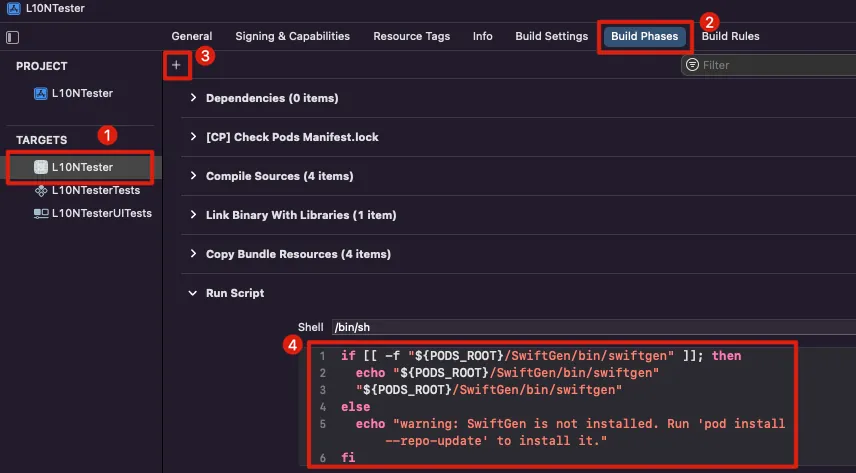
在专案设定中 -> Build Phases -> + -> New Run Script Phases -> 贴上:
if [[ -f "${PODS_ROOT}/SwiftGen/bin/swiftgen" ]]; then
  echo "${PODS_ROOT}/SwiftGen/bin/swiftgen"
  "${PODS_ROOT}/SwiftGen/bin/swiftgen"
else
  echo "warning: SwiftGen is not installed. Run 'pod install --repo-update' to install it."
fi
这样在每次 Build 专案时都会跑 Generator 产出最新的转换结果。
CodeBase 中如何使用?
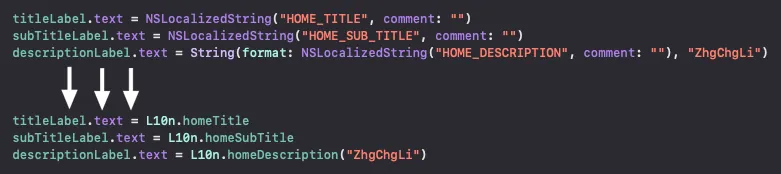
L10n.homeTitle
L10n.homeDescription("ZhgChgLi") // with arg
有了 Object Access 后就不可能出现打错字及 Code 里面有在用的 Key 但 Localizable.strings 档忘记宣告的情况。
但 SwiftGen 只能指定从某个语系产生,所以无法阻挡产生的语系有这个 Key 但在其他语系忘记定义的状况;此状况要用下面的 UnitTest 才能保护。
转换
转换才是这个问题最困难的地方,因为已开发完成的专案中大量使用 NSLocalizedString 要将其转换成新的 L10n.XXX 格式、如果是有带参数的语句又更复杂 String(format: NSLocalizedString ,另外如果有混 OC 还要考虑 OC 的语法与 Swift 不同。
没有什么特别的解法,只能自己写一个 Command Line Tools,可参考 上一篇文章 中使用 Swift 扫描专案目录、Parse 出 NSLocalizedString 的 Regex 撰写一个小工具去转换。
建议一次转换一个情境,能 Build 过再转换下一个。
-
Swift -> NSLocalizedString 无参数
-
Swift -> NSLocalizedString 有参数情况
-
OC -> NSLocalizedString 无参数
-
OC -> NSLocalizedString 有参数情况
透过 UnitTest 检查各语系档与主要语系档案有没有缺漏及 Key 有无重复
我们可以透过撰写 UniTest 从 Bundle 读取出 .strings File 内容,并加以测试。
从 Bundle 读取出 .strings 并转成物件:
class L10NTestsTests: XCTestCase {

    private var localizations: [Bundle: [Localization]] = [:]

    override func setUp() {
        super.setUp()

        let bundles = [Bundle(for: type(of: self))]

        //
        bundles.forEach { bundle in
            var localizations: [Localization] = []

            bundle.localizations.forEach { lang in
                var localization = Localization(lang: lang)

                if let lprojPath = bundle.path(forResource: lang, ofType: "lproj"),
                   let lprojBundle = Bundle(path: lprojPath) {

                    let filesInLPROJ = (try? FileManager.default.contentsOfDirectory(atPath: lprojBundle.bundlePath)) ?? []
                    localization.localizableStringFiles = filesInLPROJ.compactMap { fileFullName -> L10NTestsTests.Localization.LocalizableStringFile? in
                        let fileName = URL(fileURLWithPath: fileFullName).deletingPathExtension().lastPathComponent
                        let fileExtension = URL(fileURLWithPath: fileFullName).pathExtension
                        guard fileExtension == "strings" else { return nil }
                        guard let path = lprojBundle.path(forResource: fileName, ofType: fileExtension) else { return nil }

                        return L10NTestsTests.Localization.LocalizableStringFile(name: fileFullName, path: path)
                    }

                    localization.localizableStringFiles.enumerated().forEach { (index, localizableStringFile) in
                        if let fileContent = try? String(contentsOfFile: localizableStringFile.path, encoding: .utf8) {
                            let lines = fileContent.components(separatedBy: .newlines)
                            let pattern = "\"(.*)\"(\\s*)(=){1}(\\s*)\"(.+)\";"
                            let regex = try? NSRegularExpression(pattern: pattern, options: [])
                            let values = lines.compactMap { line -> Localization.LocalizableStringFile.Value? in
                                let range = NSRange(location: 0, length: (line as NSString).length)
                                guard let matches = regex?.firstMatch(in: line, options: [], range: range) else { return nil }
                                let key = (line as NSString).substring(with: matches.range(at: 1))
                                let value = (line as NSString).substring(with: matches.range(at: 5))
                                return Localization.LocalizableStringFile.Value(key: key, value: value)
                            }
                            localization.localizableStringFiles[index].values = values
                        }
                    }

                    localizations.append(localization)
                }
            }

            self.localizations[bundle] = localizations
        }
    }
}

private extension L10NTestsTests {
    struct Localization: Equatable {
        struct LocalizableStringFile {
            struct Value {
                let key: String
                let value: String
            }

            let name: String
            let path: String
            var values: [Value] = []
        }

        let lang: String
        var localizableStringFiles: [LocalizableStringFile] = []

        static func == (lhs: Self, rhs: Self) -> Bool {
            return lhs.lang == rhs.lang
        }
    }
}
我们定义我们定义了一个 Localization 来存放颇析出来的资料,从 Bundle 中去找 lproj 再从其中找出 .strings 然后再使用正则表示法将多语系语句转换成物件放回到 Localization ,以利后续测试使用。
这边有几个需要注意的:
-
使用
Bundle(for: type(of: self))从 Test Target 取得资源 -
记得将 Test Target 的 STRINGS_FILE_OUTPUT_ENCODING 设为
UTF-8,否则使用 String 读取档案内容时会失败 (预设会是 Biniary) -
使用 String 读取而不用 NSDictionary 的原因是,我们需要测试重复的 Key,使用 NSDictionary 会在读取的时候就盖掉重复的 Key 了
-
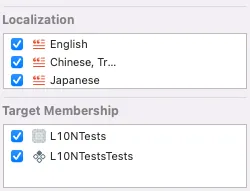
记得
.stringsFile 要增加 Test Target
TestCase 1. 测试同一个 .strings 档案内有无重复定义的 Key:
func testNoDuplicateKeysInSameFile() throws {
    localizations.forEach { (_, localizations) in
        localizations.forEach { localization in
            localization.localizableStringFiles.forEach { localizableStringFile in
                let keys = localizableStringFile.values.map { $0.key }
                let uniqueKeys = Set(keys)
                XCTAssertTrue(keys.count == uniqueKeys.count, "Localized Strings File: \(localizableStringFile.path) has duplicated keys.")
            }
        }
    }
}
Input:

Result:

TestCase 2. 与 DevelopmentLocalization 语言相比,有无缺少/多余的 Key:
func testCompareWithDevLangHasMissingKey() throws {
    localizations.forEach { (bundle, localizations) in
        let developmentLang = bundle.developmentLocalization ?? "en"
        if let developmentLocalization = localizations.first(where: { $0.lang == developmentLang }) {
            let othersLocalization = localizations.filter { $0.lang != developmentLang }

            developmentLocalization.localizableStringFiles.forEach { developmentLocalizableStringFile in
                let developmentLocalizableKeys = Set(developmentLocalizableStringFile.values.map { $0.key })
                othersLocalization.forEach { otherLocalization in
                    if let otherLocalizableStringFile = otherLocalization.localizableStringFiles.first(where: { $0.name == developmentLocalizableStringFile.name }) {
                        let otherLocalizableKeys = Set(otherLocalizableStringFile.values.map { $0.key })
                        if developmentLocalizableKeys.count < otherLocalizableKeys.count {
                            XCTFail("Localized Strings File: \(otherLocalizableStringFile.path) has redundant keys.")
                        } else if developmentLocalizableKeys.count > otherLocalizableKeys.count {
                            XCTFail("Localized Strings File: \(otherLocalizableStringFile.path) has missing keys.")
                        }
                    } else {
                        XCTFail("Localized Strings File not found in Lang: \(otherLocalization.lang)")
                    }
                }
            }
        } else {
            XCTFail("developmentLocalization not found in Bundle: \(bundle)")
        }
    }
}
Input: (相较 DevelopmentLocalization 其他语系缺少宣告 Key)

Output:

Input: (DevelopmentLocalization 没有这个 Key,但在其他语系出现)
Output:

总结
综合以上方式,我们使用:
-
新版 XCode 帮我们确保 .strings 档案格式正确性 ✅
-
SwiftGen 确保 CodeBase 引用多语系时不会打错或没宣告就引用 ✅
-
UnitTest 确保多语系内容正确性 ✅
优点:
-
执行速度快,不拖累 Build Time
-
只要是 iOS 开发者都会维护
进阶
Localized File Format
这个解决方案无法达成,还是需使用原本 用 Swift 写的 Command Line Tool 来达成 ,不过 Format 部分可以在 git pre-commit 做就好;没有 diff 调整就不做,避免每次 build 都要跑一次:
#!/bin/sh

diffStaged=${1:-\-\-staged} # use $1 if exist, default --staged.

git diff --diff-filter=d --name-only $diffStaged \\| grep -e 'Localizable.*\.\(strings\\\|stringsdict\)$' \\| \
  while read line; do
    // do format for ${line}
done
.stringdict
同样的原理也可用在 .stringdict 上
CI/CD
swiftgen 可以不用放在 build phase,因为每次 build 都会跑一次,而且 Build 完程式码才会出现,可以改成有调整再下指令产生就好。
明确得到错在哪个 Key
可优化 UnitTest 的程式,使之能输出明确是哪个 Key Missing/Reductant/Duplicate。
使用第三方工具让工程师完全解放多语系工作
如同之前「 2021 Pinkoi Tech Career Talk — 高效率工程团队大解密 」的演讲内容,在大团队中多语系工作可以透过第三方服务拆开,多语系工作的依赖关系。
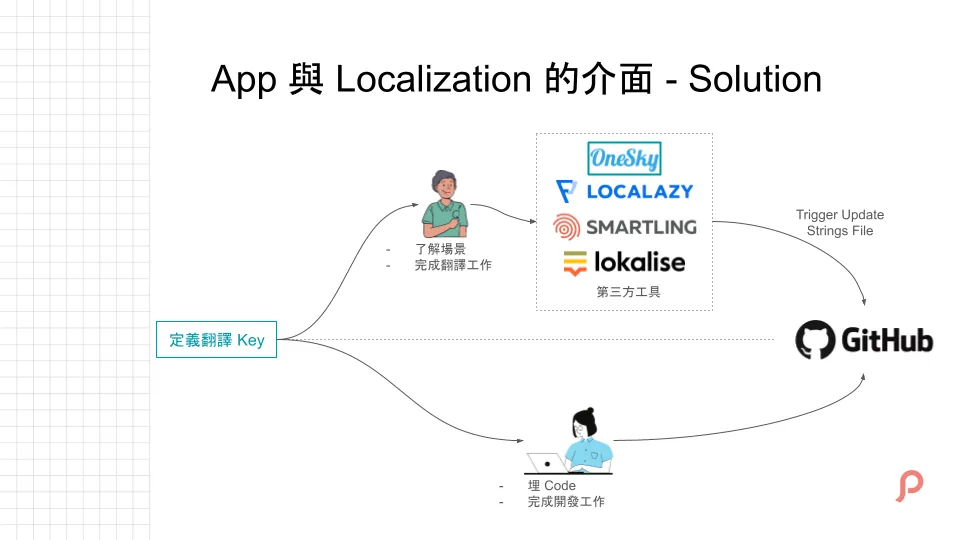
工程师只需定义好 Key,多语系会在 CI/CD 阶段从平台自动汇入,少了人工维护的阶段;也比较不容易出错。
Special Thanks

Wei Cao , iOS Developer @ Pinkoi

留言 · Comments