
使用 Google Apps Script 三步骤免费建立 Github Repo Star Notifier
撰写 GAS 串接 Github Webhook 转发按星星 Like 通知到 Line
前言
身为开源专案的维护者,不为钱不为名,只为一个 虚荣心 ;每当看到有新的 ⭐️ 星星时,心中都窃喜不已;花时间花精力做的专案真的有人在用、真的有帮助的有同样问题的朋友。
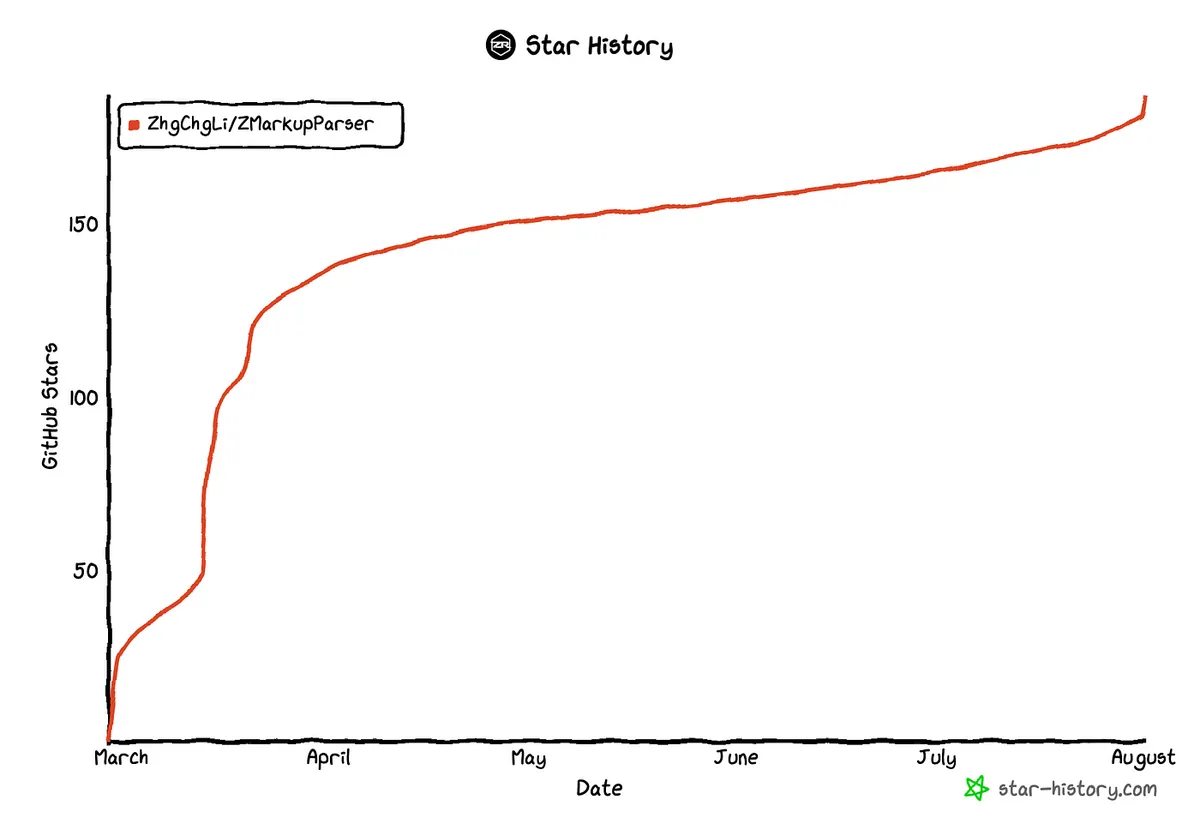
因此对 ⭐️ 星星的观测多少有点强迫症,时不时就刷一下 Github 查看 ⭐️星星 数有没有增加;我就在想有没有更主动一点的方式,当有人 按 ⭐️星星 时主动跳通知提示,不需要手动追踪查询。
现有工具
首先考虑寻找现有工具达成,到 Github Marketplace 搜寻了一下,有几个大神做好的工具可以使用。
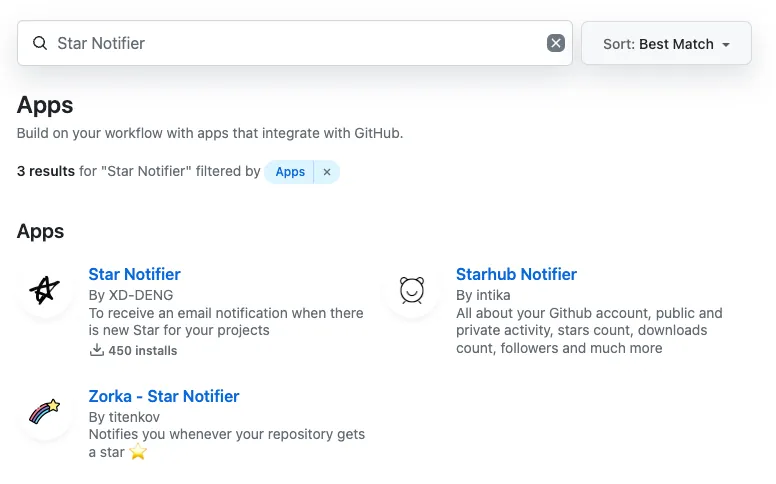
试了其中几个效果不如预期,有的已不在运作、有的只能在每 5/10/20 个 ⭐️星星 时发送通知(我只是小小,有 1 个新的 ⭐️ 就很开心了😝)、通知只能发信件但我想要用 SNS 通知。
再加上只是为了「虚荣心」装一个 App,心里不太踏实,怕有资安风险问题。
iOS 上的 Github App 或 GitTrends …等等第三方 App 也都不支援此功能。
自己打造 Github Repo Star Notifier
基于以上,其实我们可以直接用 Google Apps Script 免费、快速打造自己的 Github Repo Star Notifier。
2024/10/12 Update
⚠️⚠️⚠️
因 Line Notify 将于 2025/04/01 关闭 ,请参考 我的最新文章「 10 分钟快速移转 Line Notify 到 Telegram Bot 通知 」 改使用 Telegram 串接通知功能。
准备工作
本文以 Line 做为通知媒介,如果你想使用其他通讯软体通知可以询问 ChatGPT 如何实现。
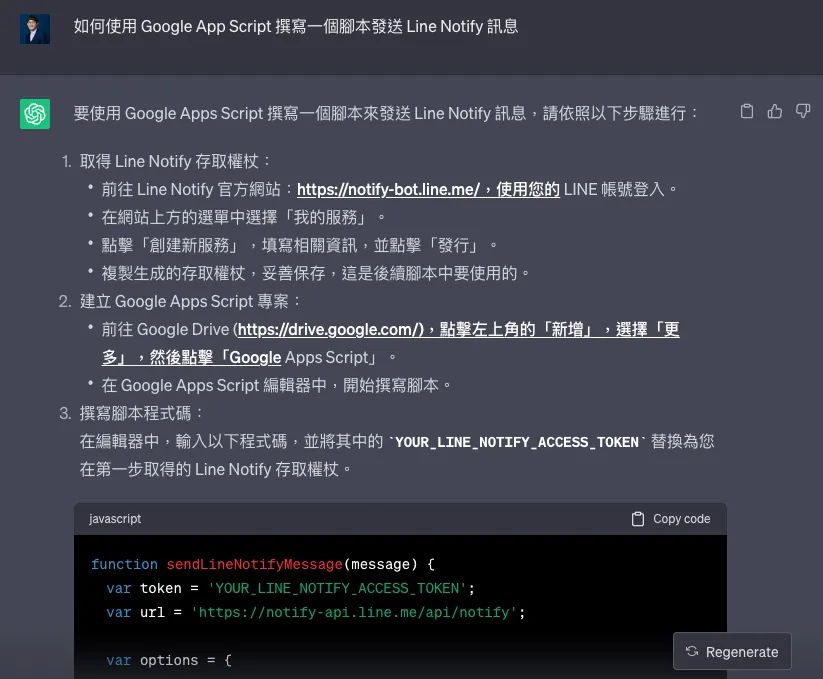
询问 ChatGPT 如何实现 Line Notify
lineToken :
-
前往 Line Notify
-
登入你的 Line 帐号之后拉到底找到「Generate access token (For developers)」区
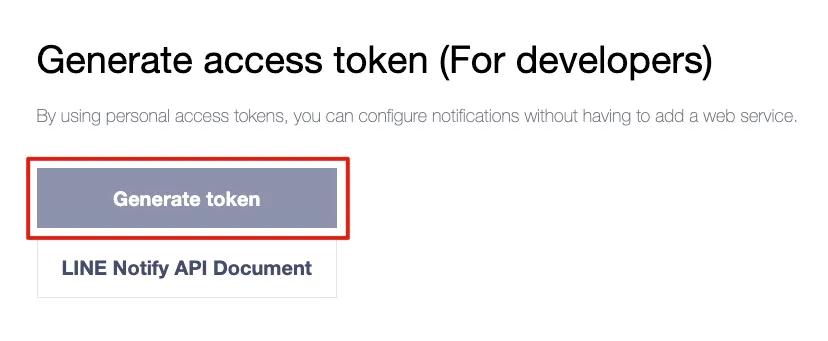
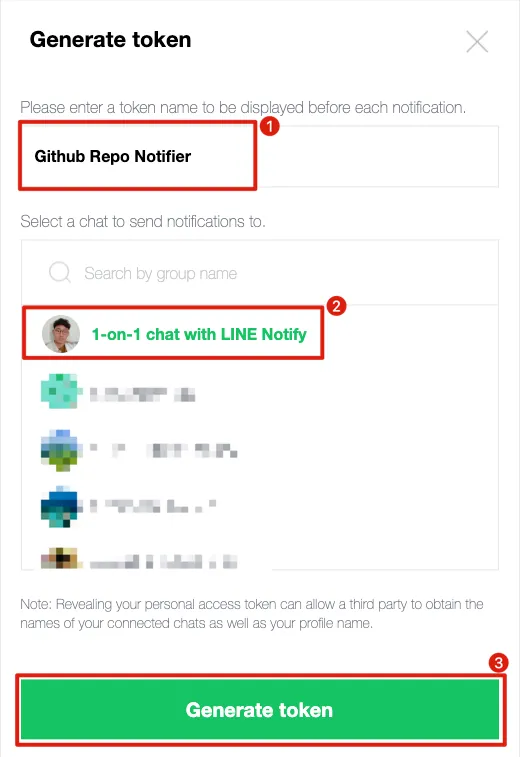
- 点击「Generate token」
-
Token Name:输入你想要的机器人头衔名称,会显示在讯息之前 (e.g.
Github Repo Notifer: XXXX) -
选择讯息要传送到的地方:我选择
1-on-1 chat with LINE Notify透过 LINE Notify 官方机器人发送讯息给自己。 -
点击「Generate token」
-
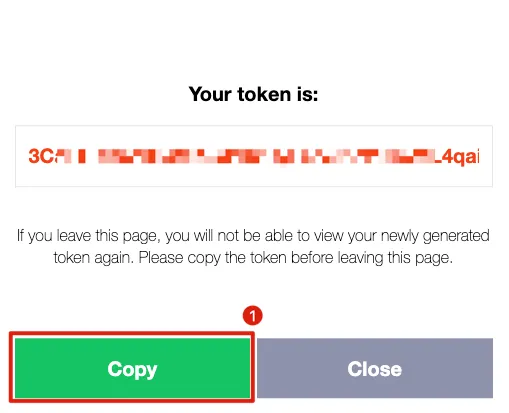
选择「Copy」
-
并记下 Token,如果日后遗忘需要重新产生,无法再次查看 。
githubWebhookSecret :
- 前往 Random.org 产生一组随机字串
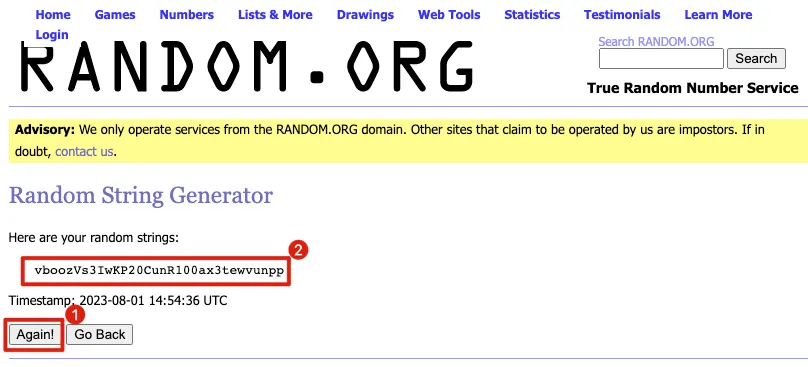
- Copy & 记下此随机字串
我们会用这组字串做为 Github Webhook 与 Goolge Apps Script 之间的请求验证媒介。
因 GAS 限制 ,无法在
doPost(e)中取得Headers内容,因此不能使用 Github Webhook 标准的验证方式 ,只能手动用?secret=Query 做字串匹配验证。
建立 Google Apps Script
前往 Google Apps Script ,点击左上角「+ 新专案」。
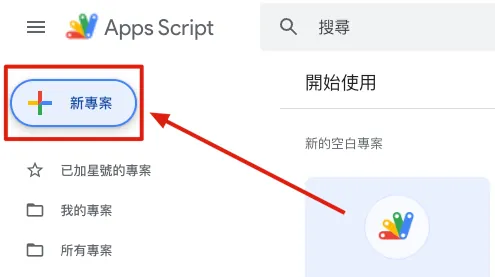
点击左上方「未命名的专案」重新命名专案。
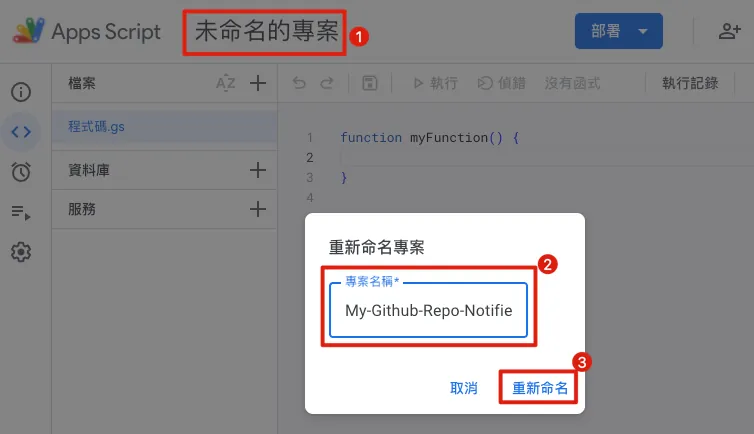
这边我把专案取名为 My-Github-Repo-Notifier 方便日后辨识。
程式码输入区域:
// Constant variables
const lineToken = 'XXXX';
// Generate yours line notify bot token: https://notify-bot.line.me/my/
const githubWebhookSecret = "XXXXX";
// Generate yours secret string here: https://www.random.org/strings/?num=1&len=32&digits=on&upperalpha=on&loweralpha=on&unique=on&format=html&rnd=new

// HTTP Get/Post Handler
// 不开放 Get 方法
function doGet(e) {
  return HtmlService.createHtmlOutput("Access Denied!");
}

// Github Webhook 会使用 Post 方法进来
function doPost(e) {
  const content = JSON.parse(e.postData.contents);

  // 安全性检查,确保请求是来自 Github Webhook
  if (verifyGitHubWebhook(e) == false) {
    return HtmlService.createHtmlOutput("Access Denied!");
  }

  // star payload data content["action"] == "started"
  if(content["action"] != "started") {
    return HtmlService.createHtmlOutput("OK!");
  }

  // 组合讯息
  const message = makeMessageString(content);

  // 发送讯息,也可改成发到 Slack,Telegram...
  sendLineNotifyMessage(message);

  return HtmlService.createHtmlOutput("OK!");
}

// Method
// 产生讯息内容
function makeMessageString(content) {
  const repository = content["repository"];
  const repositoryName = repository["name"];
  const repositoryURL = repository["svn_url"];
  const starsCount = repository["stargazers_count"];
  const forksCount = repository["forks_count"];

  const starrer = content["sender"]["login"];

  var message = "🎉🎉「"+starrer+"」starred your「"+repositoryName+"」Repo 🎉🎉\n";
  message += "Current total stars: "+starsCount+"\n";
  message += "Current total forks: "+forksCount+"\n";
  message += repositoryURL;

  return message;
}

// 验证请求是否来自于 Github Webhook
// 因 GAS 限制 (https://issuetracker.google.com/issues/67764685?pli=1)
// 无法取得 Headers 内容
// 因此不能使用 Github Webhook 标准的验证方式 (https://docs.github.com/en/webhooks-and-events/webhooks/securing-your-webhooks)
// 只能手动用 ?secret=XXX 做匹配验证
function verifyGitHubWebhook(e) {
  if (e.parameter["secret"] === githubWebhookSecret) {
    return true
  } else {
    return false
  }
}

// -- Send Message --
// Line
// 其他讯息传送方式可问 ChatGPT
function sendLineNotifyMessage(message) {
  var url = 'https://notify-api.line.me/api/notify';

  var options = {
    method: 'post',
    headers: {
      'Authorization': 'Bearer '+lineToken
    },
    payload: {
      'message': message
    }
  };
  UrlFetchApp.fetch(url, options);
}
lineToken & githubWebhookSecret 带上前一步骤复制的值。
补充 Github Webook 当有人按 Star 时会打进来的资料如下:
{
  "action": "created",
  "starred_at": "2023-08-01T03:42:26Z",
  "repository": {
    "id": 602927147,
    "node_id": "R_kgDOI-_wKw",
    "name": "ZMarkupParser",
    "full_name": "ZhgChgLi/ZMarkupParser",
    "private": false,
    "owner": {
      "login": "ZhgChgLi",
      "id": 83232222,
      "node_id": "MDEyOk9yZ2FuaXphdGlvbjgzMjMyMjIy",
      "avatar_url": "https://avatars.githubusercontent.com/u/83232222?v=4",
      "gravatar_id": "",
      "url": "https://api.github.com/users/ZhgChgLi",
      "html_url": "https://github.com/ZhgChgLi",
      "followers_url": "https://api.github.com/users/ZhgChgLi/followers",
      "following_url": "https://api.github.com/users/ZhgChgLi/following{/other_user}",
      "gists_url": "https://api.github.com/users/ZhgChgLi/gists{/gist_id}",
      "starred_url": "https://api.github.com/users/ZhgChgLi/starred{/owner}{/repo}",
      "subscriptions_url": "https://api.github.com/users/ZhgChgLi/subscriptions",
      "organizations_url": "https://api.github.com/users/ZhgChgLi/orgs",
      "repos_url": "https://api.github.com/users/ZhgChgLi/repos",
      "events_url": "https://api.github.com/users/ZhgChgLi/events{/privacy}",
      "received_events_url": "https://api.github.com/users/ZhgChgLi/received_events",
      "type": "Organization",
      "site_admin": false
    },
    "html_url": "https://github.com/ZhgChgLi/ZMarkupParser",
    "description": "ZMarkupParser is a pure-Swift library that helps you convert HTML strings into NSAttributedString with customized styles and tags.",
    "fork": false,
    "url": "https://api.github.com/repos/ZhgChgLi/ZMarkupParser",
    "forks_url": "https://api.github.com/repos/ZhgChgLi/ZMarkupParser/forks",
    "keys_url": "https://api.github.com/repos/ZhgChgLi/ZMarkupParser/keys{/key_id}",
    "collaborators_url": "https://api.github.com/repos/ZhgChgLi/ZMarkupParser/collaborators{/collaborator}",
    "teams_url": "https://api.github.com/repos/ZhgChgLi/ZMarkupParser/teams",
    "hooks_url": "https://api.github.com/repos/ZhgChgLi/ZMarkupParser/hooks",
    "issue_events_url": "https://api.github.com/repos/ZhgChgLi/ZMarkupParser/issues/events{/number}",
    "events_url": "https://api.github.com/repos/ZhgChgLi/ZMarkupParser/events",
    "assignees_url": "https://api.github.com/repos/ZhgChgLi/ZMarkupParser/assignees{/user}",
    "branches_url": "https://api.github.com/repos/ZhgChgLi/ZMarkupParser/branches{/branch}",
    "tags_url": "https://api.github.com/repos/ZhgChgLi/ZMarkupParser/tags",
    "blobs_url": "https://api.github.com/repos/ZhgChgLi/ZMarkupParser/git/blobs{/sha}",
    "git_tags_url": "https://api.github.com/repos/ZhgChgLi/ZMarkupParser/git/tags{/sha}",
    "git_refs_url": "https://api.github.com/repos/ZhgChgLi/ZMarkupParser/git/refs{/sha}",
    "trees_url": "https://api.github.com/repos/ZhgChgLi/ZMarkupParser/git/trees{/sha}",
    "statuses_url": "https://api.github.com/repos/ZhgChgLi/ZMarkupParser/statuses/{sha}",
    "languages_url": "https://api.github.com/repos/ZhgChgLi/ZMarkupParser/languages",
    "stargazers_url": "https://api.github.com/repos/ZhgChgLi/ZMarkupParser/stargazers",
    "contributors_url": "https://api.github.com/repos/ZhgChgLi/ZMarkupParser/contributors",
    "subscribers_url": "https://api.github.com/repos/ZhgChgLi/ZMarkupParser/subscribers",
    "subscription_url": "https://api.github.com/repos/ZhgChgLi/ZMarkupParser/subscription",
    "commits_url": "https://api.github.com/repos/ZhgChgLi/ZMarkupParser/commits{/sha}",
    "git_commits_url": "https://api.github.com/repos/ZhgChgLi/ZMarkupParser/git/commits{/sha}",
    "comments_url": "https://api.github.com/repos/ZhgChgLi/ZMarkupParser/comments{/number}",
    "issue_comment_url": "https://api.github.com/repos/ZhgChgLi/ZMarkupParser/issues/comments{/number}",
    "contents_url": "https://api.github.com/repos/ZhgChgLi/ZMarkupParser/contents/{+path}",
    "compare_url": "https://api.github.com/repos/ZhgChgLi/ZMarkupParser/compare/{base}...{head}",
    "merges_url": "https://api.github.com/repos/ZhgChgLi/ZMarkupParser/merges",
    "archive_url": "https://api.github.com/repos/ZhgChgLi/ZMarkupParser/{archive_format}{/ref}",
    "downloads_url": "https://api.github.com/repos/ZhgChgLi/ZMarkupParser/downloads",
    "issues_url": "https://api.github.com/repos/ZhgChgLi/ZMarkupParser/issues{/number}",
    "pulls_url": "https://api.github.com/repos/ZhgChgLi/ZMarkupParser/pulls{/number}",
    "milestones_url": "https://api.github.com/repos/ZhgChgLi/ZMarkupParser/milestones{/number}",
    "notifications_url": "https://api.github.com/repos/ZhgChgLi/ZMarkupParser/notifications{?since,all,participating}",
    "labels_url": "https://api.github.com/repos/ZhgChgLi/ZMarkupParser/labels{/name}",
    "releases_url": "https://api.github.com/repos/ZhgChgLi/ZMarkupParser/releases{/id}",
    "deployments_url": "https://api.github.com/repos/ZhgChgLi/ZMarkupParser/deployments",
    "created_at": "2023-02-17T08:41:37Z",
    "updated_at": "2023-08-01T03:42:27Z",
    "pushed_at": "2023-08-01T00:07:41Z",
    "git_url": "git://github.com/ZhgChgLi/ZMarkupParser.git",
    "ssh_url": "[email protected]:ZhgChgLi/ZMarkupParser.git",
    "clone_url": "https://github.com/ZhgChgLi/ZMarkupParser.git",
    "svn_url": "https://github.com/ZhgChgLi/ZMarkupParser",
    "homepage": "https://zhgchg.li",
    "size": 27449,
    "stargazers_count": 187,
    "watchers_count": 187,
    "language": "Swift",
    "has_issues": true,
    "has_projects": true,
    "has_downloads": true,
    "has_wiki": true,
    "has_pages": false,
    "has_discussions": false,
    "forks_count": 10,
    "mirror_url": null,
    "archived": false,
    "disabled": false,
    "open_issues_count": 2,
    "license": {
      "key": "mit",
      "name": "MIT License",
      "spdx_id": "MIT",
      "url": "https://api.github.com/licenses/mit",
      "node_id": "MDc6TGljZW5zZTEz"
    },
    "allow_forking": true,
    "is_template": false,
    "web_commit_signoff_required": false,
    "topics": [
      "cocoapods",
      "html",
      "html-converter",
      "html-parser",
      "html-renderer",
      "ios",
      "nsattributedstring",
      "swift",
      "swift-package",
      "textfield",
      "uikit",
      "uilabel",
      "uitextview"
    ],
    "visibility": "public",
    "forks": 10,
    "open_issues": 2,
    "watchers": 187,
    "default_branch": "main"
  },
  "organization": {
    "login": "ZhgChgLi",
    "id": 83232222,
    "node_id": "MDEyOk9yZ2FuaXphdGlvbjgzMjMyMjIy",
    "url": "https://api.github.com/orgs/ZhgChgLi",
    "repos_url": "https://api.github.com/orgs/ZhgChgLi/repos",
    "events_url": "https://api.github.com/orgs/ZhgChgLi/events",
    "hooks_url": "https://api.github.com/orgs/ZhgChgLi/hooks",
    "issues_url": "https://api.github.com/orgs/ZhgChgLi/issues",
    "members_url": "https://api.github.com/orgs/ZhgChgLi/members{/member}",
    "public_members_url": "https://api.github.com/orgs/ZhgChgLi/public_members{/member}",
    "avatar_url": "https://avatars.githubusercontent.com/u/83232222?v=4",
    "description": "Building a Better World Together."
  },
  "sender": {
    "login": "zhgtest",
    "id": 4601621,
    "node_id": "MDQ6VXNlcjQ2MDE2MjE=",
    "avatar_url": "https://avatars.githubusercontent.com/u/4601621?v=4",
    "gravatar_id": "",
    "url": "https://api.github.com/users/zhgtest",
    "html_url": "https://github.com/zhgtest",
    "followers_url": "https://api.github.com/users/zhgtest/followers",
    "following_url": "https://api.github.com/users/zhgtest/following{/other_user}",
    "gists_url": "https://api.github.com/users/zhgtest/gists{/gist_id}",
    "starred_url": "https://api.github.com/users/zhgtest/starred{/owner}{/repo}",
    "subscriptions_url": "https://api.github.com/users/zhgtest/subscriptions",
    "organizations_url": "https://api.github.com/users/zhgtest/orgs",
    "repos_url": "https://api.github.com/users/zhgtest/repos",
    "events_url": "https://api.github.com/users/zhgtest/events{/privacy}",
    "received_events_url": "https://api.github.com/users/zhgtest/received_events",
    "type": "User",
    "site_admin": false
  }
}
部署
完成程式撰写之后点击右上角「部署」->「新增部署作业」:
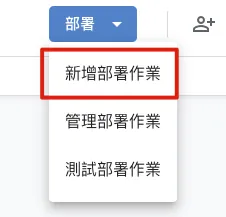
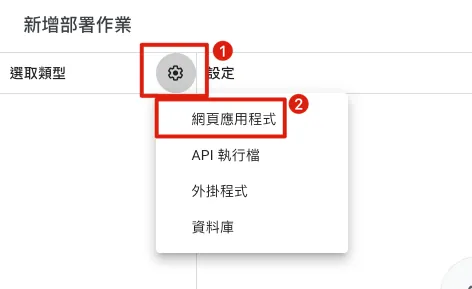
左侧选取类型选择「网页应用程式」:
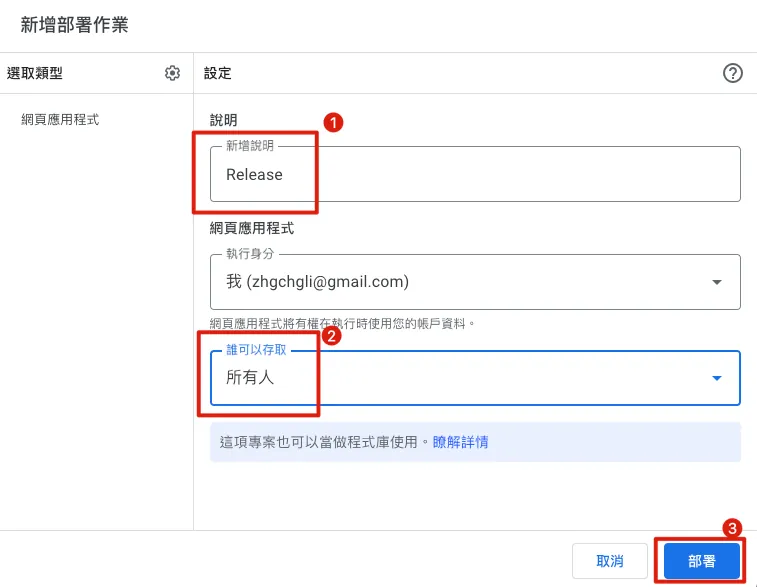
-
新增说明:随意输入,我输入「
Release」 -
谁可以存取: 请改成「
所有人」 -
点击「部署」
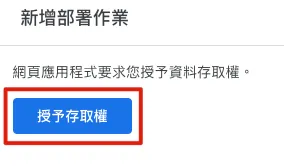
首次部署,需要点击「授予存取权」:
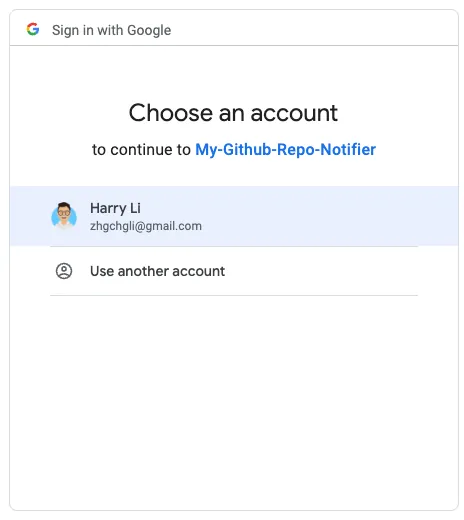
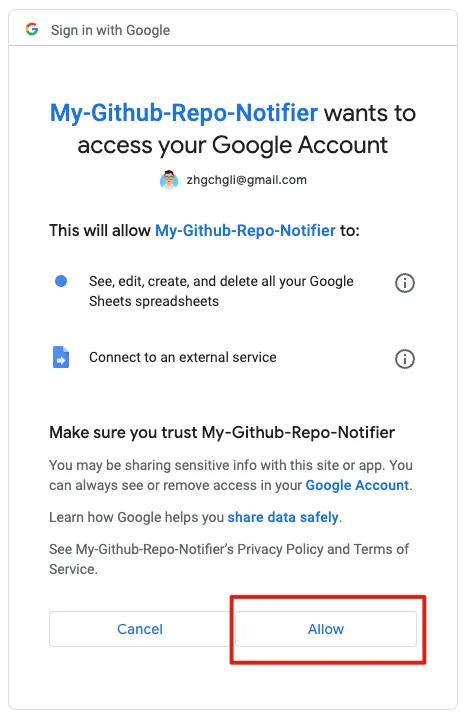
跳出帐号选择 Pop-up 后选择自己当前的 Gmail 帐号:
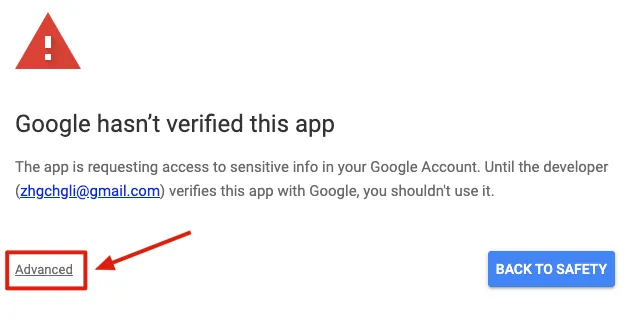
出现「Google hasn’t verified this app」因为我们要开发的 App 是给自己用的,不需经过 Google 验证。
直接点击「Advanced」->「Go to XXX (unsafe)」->「Allow」即可:
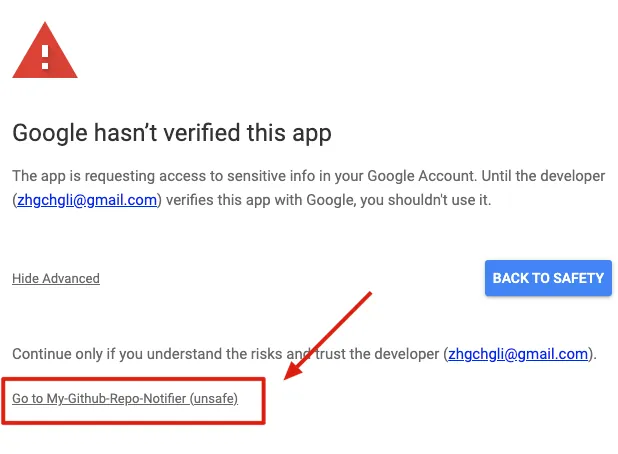
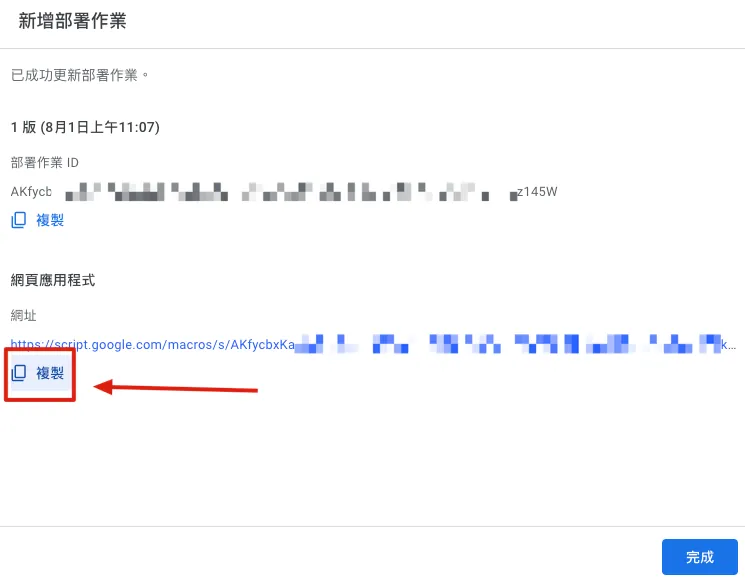
完成部署后可在结果页面的「网页应用程式」得到 Request URL,点击「复制」并记下此 GAS 网址。
⚠️️️ 题外话,请注意如果程式码有修改需要更新部署才会生效⚠️
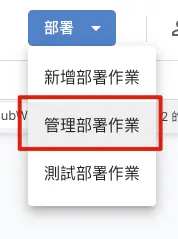
要使更改的程式码生效,同样点击右上角「部署」-> 选择「管理部署作业」->选择右上角的「✏️」->版本选择「建立新版本」->点击「部署」。
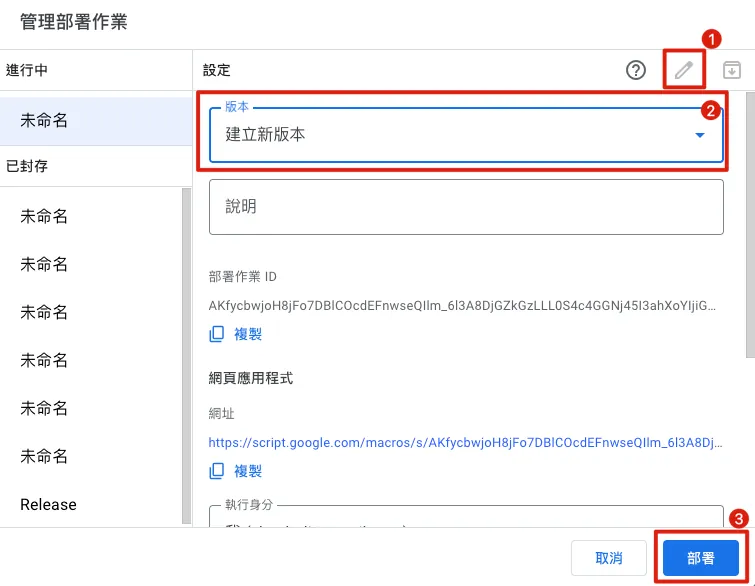
即可完成程式码更新部署。
Github Webhook 设定
-
回到 Github
-
我们可以对 Organizations (里面所有 Repo)或单个 Repo 设定 Webhook,监听新的 ⭐️ 星星
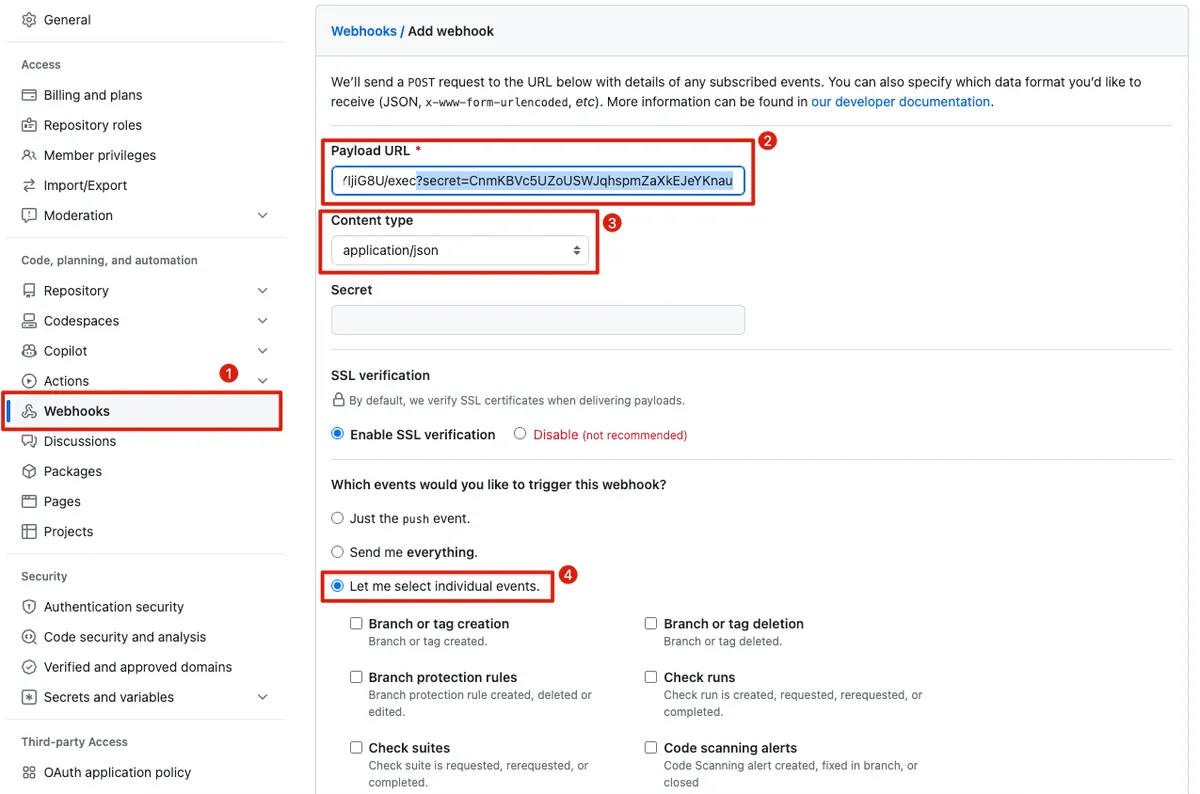
进入 Organizations / Repo -> 「Settings」-> 左侧找到「Webhooks」-> 「Add webhook」:
-
Payload URL : 输入
GAS 网址并在网址后面手动加上我们自己的安全验证字串?secret=githubWebhookSecret。 例如你的GAS 网址是https://script.google.com/macros/s/XXX/exec、githubWebhookSecret是123456;则 网址即为:https://script.google.com/macros/s/XXX/exec?secret=123456。 -
Content type: 选择
application/json -
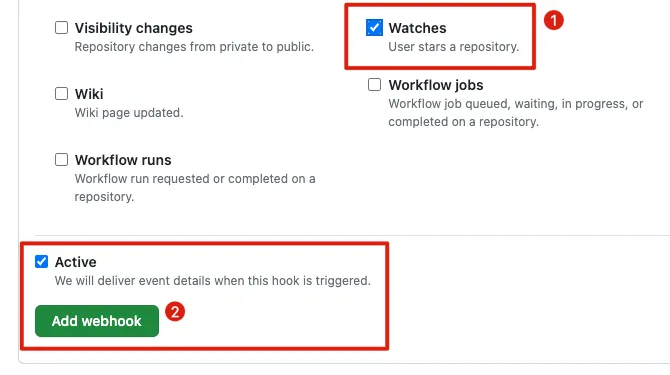
Which events would you like to trigger this webhook? 选择「
Let me select individual events.」 ⚠️️取消勾选「Pushes」 ️️️️⚠️勾选「Watches」,请注意不是「Stars」(但 Stars 也是监控点击星星的状态,如果用 Stars GAS 的 action 判断也需要调整 ) -
选择「
Active」 -
点击「Add webhook」
-
完成设定
🚀测试
回到 设定的 Organizations Repo / Repo 上点击「Star」或先 un-star 再重新 「Star」:

就会收到推播通知啰!
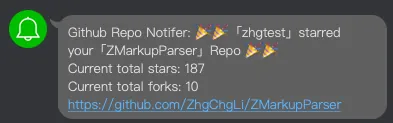
收工!🎉🎉🎉🎉


留言 · Comments